Testing & Evaluations
Parlant's testing framework approaches evaluations from a behavior-driven perspective. The framework lets you define concrete expectations about specific behaviors at key points in the conversation. Because you define your agent's guidelines and journeys, you know what it ought to do in various, applicable situations.
Incidentally, because you can review your agent's configuration, the framework also lends itself perfectly to automatic test generation. You can let a coding agent analyze your agent's guidelines and journeys to create tests that verify correct behavior, ensuring your agent follows the rules you've defined.
Quick Start
Create a test file:
# test_agent.py

from parlant.testing import Suite, CustomerMessage, AgentMessage

suite = Suite(
    server_url="http://localhost:8800",
    agent_id="my-agent",
)

@suite.scenario
async def test_successful_scenario():
    async with suite.session() as session:
        response = await session.send("Hello!")
        await response.should("greet the customer")

@suite.scenario
async def test_failing_scenario():
    async with suite.session() as session:
        response = await session.send("Hello!")
        await response.should("offer a million dollars")  # shouldn't pass
When creating your agent, we recommend setting a manual ID so it remains consistent across configuration changes:
agent = await server.create_agent(
    name="My Agent",
    id="my-agent",  # Use this ID in your tests
)
This ensures your test suite always targets the same agent.
Run the test:
parlant-test test_agent.py
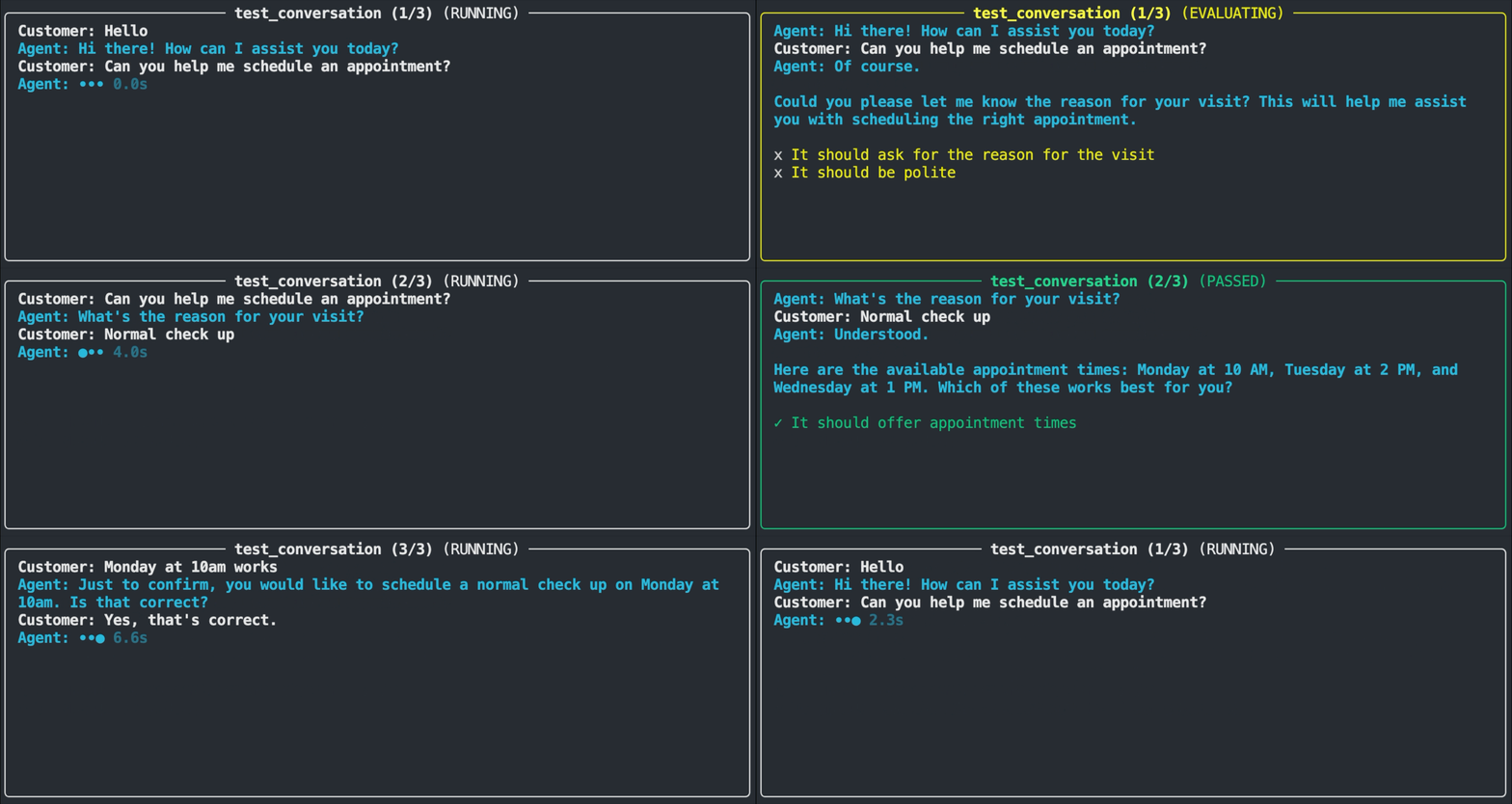
The test runner displays a real-time view of each test as it executes. You'll see the customer message being sent, the agent's response appearing, and the evaluation result. Passing tests flash in green, while failures flash in red and show the assertion that wasn't met along with the actual response.
When the run completes, you'll see a summary of total tests passed and failed, along with explanations.
Testing Multi-Turn Conversations
Multi-turn conversations are tested using the unfold() method. Multi-turn flows are trickier because you don't know exactly how the agent will phrase each response, and those small variations accumulate expectation-drift at each turn, making subsequent assertions more brittle.
The unfold() method solves this by testing each assertion point in isolation, with a fresh session preloaded with the exact conversation history you define using the text message field:
@suite.scenario
async def test_booking_flow():
    async with suite.session() as session:
        await session.unfold([
            CustomerMessage("I'd like to book a flight"),
            AgentMessage(
                "I'd be happy to help!",
                should="acknowledge the request",
            ),
            CustomerMessage("To Paris, next Monday"),
            AgentMessage(
                "Let me check flights to Paris for Monday.",
                should="confirm the destination and date",
            ),
        ])
See Multi-Turn Conversation Testing to understand exactly how unfold() works. It's a powerful feature!
Core Concepts
Test Suites
A Suite is the container for your tests. It manages the connection to your Parlant server and provides the tools for creating scenarios:
from parlant.testing import Suite

suite = Suite(
    server_url="http://localhost:8800",
    agent_id="my-agent",
    response_timeout=60,  # max seconds to wait for agent response
)
Scenarios
The @suite.scenario decorator registers a test function:
@suite.scenario
async def test_greeting():
    async with suite.session() as session:
        # Send a customer message
        response = await session.send("Hello!")
        # Make an assertion on the response
        await response.should("greet the customer")
Repetitions
Because LLM responses can vary, you may want to run the same test multiple times to verify consistent behavior. The repetitions parameter runs the scenario N times, all of which much succeed:
@suite.scenario(repetitions=5)
async def test_refund_policy():
    async with suite.session() as session:
        response = await session.send("What's your refund policy?")
        await response.should("mention the 30-day refund window")
Sessions
suite.session() creates a conversation context for interacting with your agent:
async with suite.session() as session:
    # Conversation happens here
    ...

# Override agent for this particular test
async with suite.session(agent_id="different-agent") as session:
    ...
Sending Messages and Receiving Responses
session.send() sends a customer message and waits for the agent's response:
response = await session.send("What's my order status?")
The Response object provides access to:
.message— the agent's concatenated text response (including the preamble and split messages).messages— the list of independent messages were sent for in response.tool_calls— any tools the agent called.status_events— status updates during processing
NLP-Based Assertions
The .should() method is how you assert on agent responses. Instead of comparing exact strings, you describe what the response should do.
response = await session.send("Hello!")
await response.should("greet the customer")
Under the hood, this formats your condition as "The message should greet the customer" and uses an LLM to evaluate whether the agent's actual response meets that criterion.
Condition Grammar
The argument to .should() is a verb phrase that completes the sentence "The message should...". Write it as an action the response performs:
Examples of Good and Bad Conditions
DON'T
"greet the customer"
"mention the 30-day refund window"
"offer to connect to a human agent"
"The message should greet the customer"— don't repeat "the message should"
"greeted the customer"— use present tense, not past
"a greeting"— use a verb phrase, not a noun
Multiple Conditions
You can assert multiple conditions on a single response by passing a list:
response = await session.send("What's your refund policy?")
await response.should([
    "mention the 30-day refund window",
    "explain how to initiate a refund",
    "be polite and helpful",
])
Conditions are evaluated in parallel. If any fails, the test fails and reports which specific assertion wasn't met.
This is the preferred way to test multiple expectations on a single response, rather than combining them into one compound condition like "mention the refund window and explain how to initiate one". Separate conditions make it easier to identify which specific assertion failed, and the NLP evaluation produces more consistent results when each condition is focused on a single behavior.
Writing Effective Conditions
Good conditions are specific and behavioral:
| ❌ Vague | ✅ Specific |
|---|---|
| "be helpful" | "offer to assist with the booking" |
| "be correct" | "state that the refund window is 30 days" |
| "handle the error" | "apologize and offer to connect to support" |
The more specific your condition, the more reliable your test. Vague conditions like "be friendly" can pass even when the agent isn't behaving as intended.
Multi-Turn Conversation Testing
As mentioned before, the unfold() method lets you define a multi-turn conversation and assert on the agent's response at each step.
The challenge with testing multi-turn flows on a turn-by-turn basis is drift: you don't know exactly how the agent will phrase each response or what nuances might creep into it, and those variations accumulate. By the time you reach turn 5, the nuances of the conversation have drifted in small but unpredictable ways, making assertions on subsequent responses brittle since new responses are affected by all previous turns.
unfold() solves this by testing each assertion point in isolation. For every AgentMessage with a should condition, it creates a fresh session with all prior turns injected as preloaded history (using your specified text responses). Then it sends the preceding customer message to the live agent. This tells you how the agent continues a conversation from that exact point—as if it had just landed in that conversation with the context you defined.
from parlant.testing import CustomerMessage, AgentMessage

@suite.scenario
async def test_booking_flow():
    async with suite.session() as session:
        await session.unfold([
            CustomerMessage("I'd like to book a flight"),
            AgentMessage("Happy to help! Where to?", should="ask where to"),
            CustomerMessage("To Paris, next Monday"),
            AgentMessage(
                "Let me check flights to Paris for Monday.",
                should="confirm the destination and date"
            ),
            CustomerMessage("Morning flights please"),
            AgentMessage("Here are the morning flights...", should="present flight options"),
        ])
How It Works
Each AgentMessage with a should condition becomes a separate sub-test, where the text field serves as the "script" for building the conversation history when testing subsequent turns.
Let's consider the example above. It would create three sub-tests:
Test 1
Customer: "I'd like to book a flight"      ← sent live
Agent: ...                                 ← tested: should="ask where to"
Test 2
Customer: "I'd like to book a flight"      ← preloaded
Agent: "Happy to help! Where to?"          ← preloaded (from text)
Customer: "To Paris, next Monday"          ← sent live
Agent: ...                                 ← tested: should="confirm the destination and date"
Test 3
Customer: "I'd like to book a flight"      ← preloaded
Agent: "Happy to help! Where to?"          ← preloaded (from text)
Customer: "To Paris, next Monday"          ← preloaded
Agent: "Let me check flights..."           ← preloaded (from text)
Customer: "Morning flights please"         ← sent live
Agent: ...                                 ← tested: should="present flight options"
Sub-tests within an unfold() run sequentially and appear in the same panel in the test UI, showing the conversation flow as it progresses.
History-Only Steps
If you want to include a step in the conversation without creating a test for it, omit the should field:
await session.unfold([
    CustomerMessage("Hi"),
    AgentMessage("Hello! How can I help?"),  # No assertion, just history
    CustomerMessage("What's my balance?"),
    AgentMessage("Your balance is $100.", should="state the account balance"),
])
Building Preloaded History
While unfold() handles most multi-turn testing needs, sometimes you need more control. The InteractionBuilder lets you construct conversation history manually and inject it into a session.
Using InteractionBuilder
from parlant.testing import InteractionBuilder, CustomerMessage, AgentMessage

@suite.scenario
async def test_cancellation_reason():
    history = (
        InteractionBuilder()
        .step(CustomerMessage("Hi, I need help"))
        .step(AgentMessage("Hello! How can I assist you today?"))
        .step(CustomerMessage("I want to cancel my subscription"))
        .step(AgentMessage("I can help with that. Let me pull up your account."))
        .build()
    )

    async with suite.session() as session:
        await session.add_events(history)
        response = await session.send("I found a cheaper alternative")
        await response.should("acknowledge the reason and attempt to retain the customer")
Hooks
Hooks let you run setup and teardown logic at different points in the test lifecycle.
Suite-Level Hooks
Run once before or after all tests in the suite:
@suite.before_all
async def setup():
    # Initialize external services, seed test data, etc.
    suite.context["api_client"] = create_api_client()

@suite.after_all
async def teardown():
    # Cleanup
    await suite.context["api_client"].close()
Test-Level Hooks
Run before or after each individual test:
@suite.before_each
async def before_test(test_name: str):
    print(f"Starting: {test_name}")

@suite.after_each
async def after_test(test_name: str, passed: bool, error: str | None):
    if not passed:
        print(f"Failed: {test_name} - {error}")
Shared Context
The suite.context dictionary lets you share data between hooks and tests:
@suite.before_all
async def setup():
    suite.context["test_customer"] = await create_test_customer()

@suite.scenario
async def test_personalized_greeting():
    customer_id = suite.context["test_customer"].id
    async with suite.session(customer_id=customer_id) as session:
        response = await session.send("Hi")
        await response.should("greet the customer by name")
Accessing the Parlant Client
The suite.client property provides direct access to the Parlant API client for advanced setup and teardown:
@suite.before_all
async def setup():
    # Create test data using the API
    customer = await suite.client.customers.create(name="Test User")
    suite.context["customer_id"] = customer.id

@suite.after_all
async def teardown():
    # Clean up test data
    await suite.client.customers.delete(suite.context["customer_id"])
Running Tests
Basic Usage
Run all tests in a file or directory:
parlant-test tests/
parlant-test tests/test_greeting.py
Common Options
# Filter tests by name pattern (regex)
parlant-test tests/ --pattern "greeting"

# Run tests in parallel
parlant-test tests/ --parallel 4

# Export results to JSON
parlant-test tests/ --output results.json

# Stop on first failure
parlant-test tests/ --fail-fast

# List discovered tests without running them
parlant-test tests/ --list
 Need help with testing?